


Remote Work Stipend Benchmarker
Stop guessing what a remote stipend should be. This tool turns a few company details into clear, tiered benchmarks for setup and ongoing costs—ready to share with leadership.
What Is a Remote Work Stipend?
A remote work stipend is money an employer provides to help cover the costs of working from home, such as home office equipment, internet, utilities, phone expenses, or other remote work needs. Setting the right amount helps companies stay competitive, support employees fairly, and manage remote work costs more consistently.
To make the process easier, access the Remote Work Stipend Benchmarker above to compare stipend amounts and create a clearer, customizable recommendations.
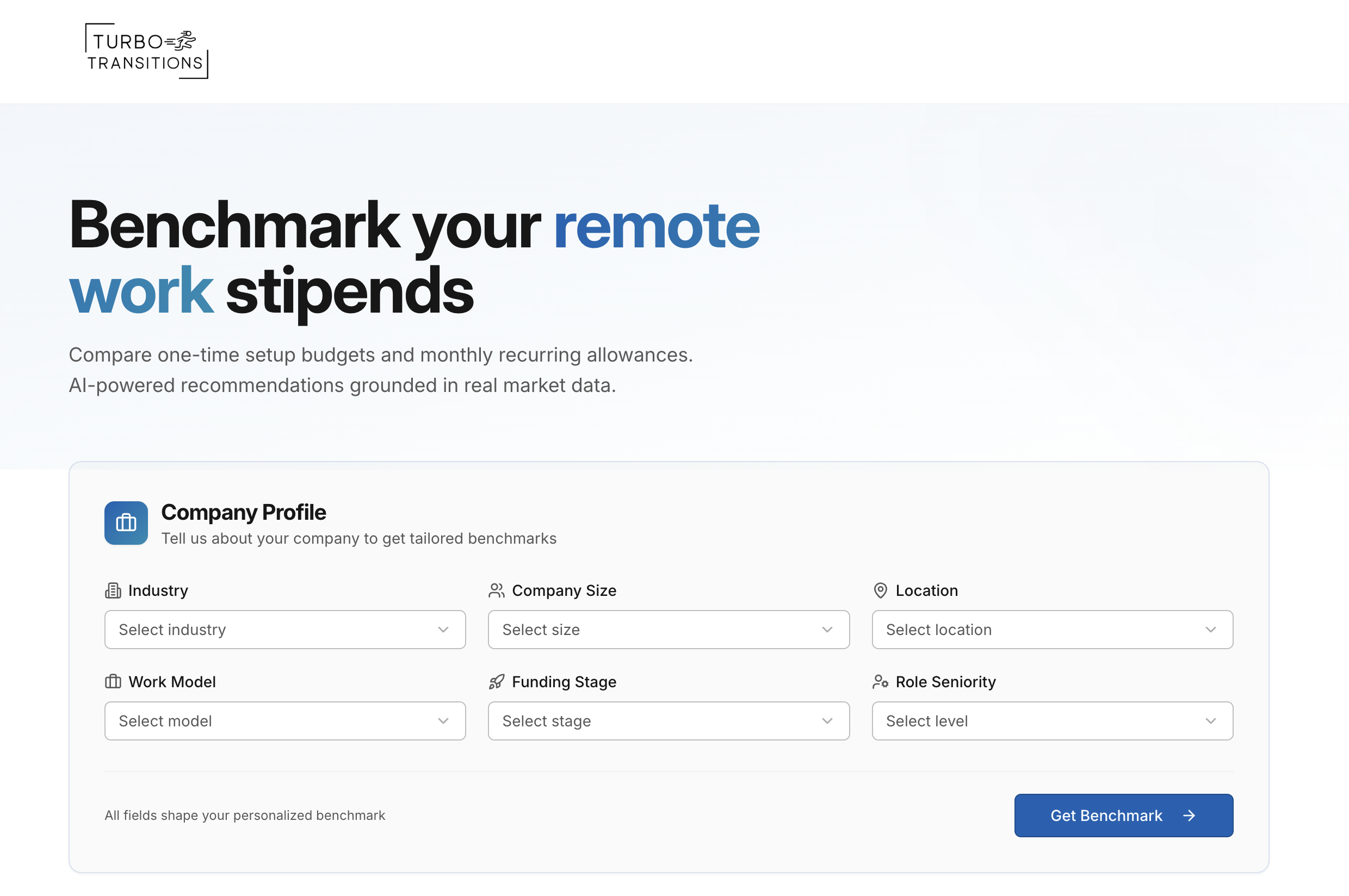
Remote Work Stipend Benchmarker
What it does:
This tool helps HR professionals quickly determine how much their company should budget for remote work stipends. It takes into account key factors like industry, company size, geographic location, work model, funding stage, and role seniority to generate tailored benchmarks. Results are broken into one-time setup costs (such as furniture and equipment) and monthly recurring allowances (such as internet, co-working space, and utilities).
Each category displays three spending tiers — Average, Competitive, and Top Tier — giving a clear picture of the market landscape. The recommendations are grounded in conservative, research-backed data that reflects real-world spending patterns, including the fact that many companies still offer no stipend at all.
How it works:
Users complete a short form with six company-specific inputs. Those inputs are processed by an AI model that has been calibrated with market data on remote work stipend practices. The AI evaluates the unique combination of factors — recognizing, for example, that a large tech company in a major city will have very different benchmarks than a small retail business in a rural area — and returns category-by-category stipend recommendations across three tiers.
Results appear in a clean, organized layout within seconds.
Why it's beneficial for HR professionals:
Reliable data on remote work stipends is scattered and inconsistent, making it difficult for HR teams to set budgets with confidence. Without a clear benchmark, companies risk either overspending or falling behind competitors in attracting and retaining talent.
This tool solves that by delivering personalized, data-informed recommendations in seconds — replacing what would otherwise be hours of manual research. The tiered breakdown also makes it easy for HR professionals to present options to leadership and justify budget decisions with market context.

Why Knowing Stipend Benchmarks Is Important
Remote work stipends aren’t just a perk—they’re a budgeting, equity, and retention decision.
Without benchmarks, companies often swing between two extremes: offering nothing (and losing candidates to better-supported competitors) or overspending on allowances that don’t match their size, industry, or work model.
Clear benchmarks help HR set fair, defensible stipend ranges across roles and locations, avoid internal pay-equity friction, and give leadership concrete numbers they can approve with confidence.

“Take care of your employees and they’ll take care of your business.”
— Richard Branson, Founder of Virgin Group
Frequently Asked Questions (FAQ)
What is a remote work stipend (and what does it usually cover)?
A remote work stipend is money a company provides to help employees cover the extra costs of working from home. In practice, it usually falls into two buckets: one-time setup (desk, chair, monitor, keyboard, headset, lighting) and ongoing monthly support (internet, phone, co-working, software upgrades, sometimes a small utilities offset). The cleanest programs are specific about what’s reimbursable, what requires receipts, and what’s considered “nice-to-have” versus necessary to do the job well.
Key Takeaway: A stipend works best when it’s clearly defined—setup vs. monthly—and tied to real work-from-home costs.
How much should a company budget for a remote work stipend?
There isn’t a single “right” number because the right budget depends on your industry, hiring competitiveness, work model (fully remote vs. hybrid), and role requirements. A practical approach is to set three tiers: a baseline that’s sustainable, a competitive tier if you’re hiring aggressively, and a top tier if you’re in high-comp markets. Most companies that offer stipends separate it into a one-time setup amount plus a smaller monthly allowance rather than one big ongoing payment.
Key Takeaway: Budgeting is easier (and more defensible) when you set baseline/competitive/top tiers and split setup from monthly.
What’s the difference between a stipend and a reimbursement policy?
A stipend is typically a fixed amount you provide (sometimes without receipts, depending on your policy), while reimbursement requires employees to submit expenses and you repay the exact amount that qualifies. Stipends are easier to administer and feel predictable for employees; reimbursements are more controlled and can be better when you want tight guardrails. Many companies use a hybrid: stipend for simple recurring items (internet) and reimbursement for larger equipment purchases (chair/desk) with receipts.
Key Takeaway: Stipends are simpler; reimbursements are tighter—many HR teams combine both to get the best of each.
Should we offer a one-time home office setup stipend, a monthly stipend, or both?
If you can only do one, start with a one-time setup because it directly impacts comfort and productivity (and avoids “forever payments”). Monthly stipends make sense when you want to offset recurring costs like internet or co-working, especially for fully remote roles. A balanced strategy is: a one-time setup budget plus a small monthly allowance for roles that truly depend on reliable connectivity or require a dedicated workspace.
Key Takeaway: Setup stipends solve the biggest pain point first; monthly stipends are best reserved for truly recurring work needs.
How do we keep stipends fair across roles and locations?
Fairness comes from consistency and logic. Most companies define stipend eligibility based on work model (remote/hybrid), role needs (call-heavy roles need better internet/headsets), and sometimes seniority (leaders may need more robust setups for video calls). Location can matter, but it can also create internal friction—so if you adjust by geography, keep it simple (e.g., broad bands) and explain the reasoning clearly. The goal is “equitable,” not identical: people should have what they need to do great work.
Key Takeaway: Build fairness around job needs and work model first, then use simple geographic bands only if truly necessary.
What should we include in a remote stipend policy (so it doesn’t get messy)?
A good policy answers the questions employees will immediately ask: Who’s eligible? What does it cover? How is it paid? What requires receipts? What’s not covered?
Also include practical guardrails like: whether equipment becomes company property, what happens at termination, replacement cycles, and whether stipends are taxable in your jurisdiction. The clearer the policy, the fewer uncomfortable one-off exceptions HR has to manage.
Key Takeaway: A strong stipend policy prevents chaos by spelling out eligibility, covered items, proof requirements, and edge cases upfront.
Are remote work stipends taxable?
It depends on how the stipend is structured and the rules in your country/state, so you should confirm with payroll or a tax professional. In many cases, a flat stipend paid without substantiation can be treated as taxable wages, while properly documented reimbursements under an accountable plan may be non-taxable (U.S. context).
The safe HR move is to decide upfront whether you’re doing a true reimbursement plan (with receipts) or a taxable stipend and communicate that clearly to employees.
Key Takeaway: Tax treatment depends on how you administer the benefit—confirm with payroll/tax and communicate it plainly.
Should we offer stipends to hybrid employees too?
Often, yes—but usually at a reduced level. Hybrid employees still work from home part of the week, so they still need a functional setup, but they may also have access to office equipment and utilities. A common approach is a one-time setup stipend for anyone who works remotely a meaningful amount, and a monthly stipend only for fully remote employees (or only for roles with heavy internet/phone requirements).
Key Takeaway: Hybrid stipends can be fair and cost-effective when you scale them down and align them to actual remote usage.
What if we don’t offer a stipend at all—will it hurt hiring and retention?
It can, depending on your talent market. Many companies still offer no stipend, but candidates increasingly compare remote support when choosing between similar offers—especially in competitive roles. Even a modest, clearly communicated setup stipend can signal that you care about employee success and can reduce early frustration (poor ergonomics, unreliable internet). If budget is tight, start small and tie it to productivity essentials rather than “nice-to-haves.”
Key Takeaway: You don’t need a huge stipend to be competitive—small, essential support can meaningfully improve recruiting and retention.
How do we roll out a stipend program without creating confusion or resentment?
Start with a simple structure, communicate it clearly, and avoid exceptions that feel arbitrary. Explain the “why” (productivity, ergonomics, consistent support), define eligibility rules, and give examples of what the stipend covers. If you’re changing an existing policy, acknowledge the change and set a transition plan (effective date, who qualifies, how current employees are handled). The smoothest rollouts feel consistent, practical, and easy to use.
Key Takeaway: The best rollouts are simple, clearly explained, and consistent—so employees understand the rules and trust the process.
What expenses should a remote stipend cover versus what should be company-provided equipment?
A good rule is this: if it’s essential for the job and you want standardization, provide it as company equipment. If it’s more personal preference or varies widely by individual, cover it through a stipend or reimbursement.
For example, laptops and security tools are typically company-provided because IT needs control and consistency. Chairs, desks, lighting, and small accessories often fit better under a stipend because people have different needs and existing setups. When you separate these clearly, you reduce back-and-forth and avoid employees feeling like they have to “negotiate” basics.
Key Takeaway: Provide standardized essentials as company equipment, and use stipends for flexible, personal setup items.
Should we require receipts for stipend spending?
It depends on how much control you want and how much admin work you can tolerate. Requiring receipts usually reduces misuse and can help with tax handling, but it creates friction and time for both employees and HR.
Not requiring receipts makes the program easier to use, but it can feel less fair if some employees spend it responsibly and others treat it like extra pay. Many teams land on a middle ground: no receipts for a small monthly amount, and receipts for larger one-time setup purchases above a threshold.
Key Takeaway: Receipts increase control but add friction, so many companies use thresholds to keep the program simple.
How do we avoid remote stipend “policy creep” where every request becomes an exception?
The best defense is specificity. List what’s covered, what’s not covered, and what requires approval. Use categories rather than open-ended language, and include a short “exception” rule that sets a high bar, such as requiring a documented role requirement or ergonomic need.
Also give managers a script so they don’t promise things ad hoc. When employees see consistent decisions, the requests usually calm down quickly.
Key Takeaway: Clear categories and a tight exception rule prevent the stipend from turning into a constant negotiation.
How do we handle stipends for contractors, interns, or part-time employees?
This comes down to consistency and practicality. If a worker is expected to be fully remote and needs tools to do the job well, some level of support is reasonable. Many companies prorate the benefit based on hours, length of engagement, or role requirements.
For interns and short-term contractors, a smaller setup amount or company-provided equipment is often cleaner than a broad monthly stipend. Whatever you choose, put it in writing so it doesn’t feel arbitrary.
Key Takeaway: Decide upfront who qualifies and whether benefits are prorated, then document it to keep decisions consistent.
What’s a fair approach for co-working space allowances?
Co-working support is usually best treated as optional and role-dependent. It’s most helpful for employees who lack a productive home environment, live in small spaces, or need occasional meeting rooms.
A common approach is to offer a modest monthly allowance for fully remote employees, with a higher amount only when there’s a documented need. Another approach is reimbursement for actual co-working membership costs up to a limit. Either way, clarify whether it covers day passes, memberships, or meeting rooms.
Key Takeaway: Co-working allowances work best as role- or need-based support with a clear monthly cap.
How often should we revisit our stipend benchmarks?
Most companies do it annually, or anytime there’s a major shift in hiring strategy, remote work policy, or labor market pressure. If you’re actively recruiting in competitive roles, checking benchmarks twice a year can be worthwhile. The main point is to avoid letting your numbers go stale, because employees and candidates will notice when your policy feels like it’s from a different era.
Key Takeaway: Revisit benchmarks at least yearly, and more often if hiring competitiveness or remote policy changes.
If we offer a stipend, should we reduce salary offers accordingly?
In most cases, no. Candidates typically view stipends as support for work-related costs, not as compensation that replaces salary. If a company tries to offset salary because of a stipend, it can backfire and feel like a hidden trade. A better approach is to treat stipends as part of your total rewards story, but keep base pay aligned to market rates for the role.
Key Takeaway: Stipends should support productivity, not substitute for competitive compensation.
How do we handle stipend eligibility when an employee changes roles or moves locations?
Keep rules simple and predictable. If eligibility is tied to work model, then changes in remote status should trigger changes in stipend access.
If you adjust by geography, define broad location bands so you’re not constantly recalculating. Also set a clear rule for timing, such as “changes take effect next payroll cycle,” so employees know what to expect. Documenting these transitions prevents confusion and awkward surprises.
Key Takeaway: Tie eligibility to clear triggers like work model changes, and apply updates on a predictable schedule.
What’s the best way to communicate stipends to employees so they actually understand the value?
Most people skim policies, so it helps to communicate in three layers. First, a one-paragraph summary of who qualifies and what they get. Second, a simple list of what it covers with a few examples.
Third, a short FAQ about edge cases like receipts, tax treatment, and what happens at separation. When employees can understand it quickly, HR gets fewer tickets and the benefit actually improves the employee experience.
Key Takeaway: A simple summary plus examples and a short FAQ makes stipend programs easier to adopt and easier to defend.
What happens to remote stipend equipment or purchases when someone leaves the company?
This depends on whether the company provides equipment or the employee buys items with a stipend. Company-provided equipment is typically returned at separation, and your offboarding process should make that clear.
Stipend purchases are usually treated as the employee’s property, but some companies add a policy for recent purchases, especially if someone leaves immediately after receiving a large setup amount. If you use a clawback rule, keep it straightforward and communicate it before anyone spends the money.
Key Takeaway: Define ownership and return expectations upfront, and if you use a clawback rule, make it simple and clearly disclosed.
Disclaimer
Disclaimer. These tools and their outputs are for informational purposes only and are not legal, compliance, financial, tax, or HR advice; using them does not create an attorney–client or advisory relationship. Laws vary and change—always review results with your legal, benefits, and HR advisors before acting.
Data & access. By default we don’t store personally identifiable information you enter. Each tool is unlocked per page with your work email so we can send exports/resources and optional help; one tool’s email doesn’t unlock others, and you can unsubscribe anytime. If you choose Save, your project is stored securely and auto-deleted after {{X}} days; you can request deletion anytime at contact@turbotransitions.com.
Privacy & security. We use commercially reasonable safeguards, but no method is 100% secure. For saved projects you remain the data controller and we act as a processor under your instructions. You’re responsible for reviewing outputs before sharing and for controlling access to shared links/PDFs/CSVs. We may use de-identified, aggregated usage data to improve the tools; we do not sell personal data.
Scope, third parties & liability. Outputs are generic/non-jurisdictional and may not be complete or current; compliance-adjacent items include “verify with counsel” reminders. Linked third-party sites (e.g., carriers/HRIS) have their own policies—we’re not responsible for their content or security. Services are provided as is/as available with no warranties; to the extent allowed by law, we’re not liable for indirect or consequential damages.
Tags: remote work stipend, work from home stipend, remote work allowance, home office stipend, internet stipend for remote employees, remote stipend policy, work from home reimbursement policy