


Compensation Statement Calculator
Show employees what they’re really earning—beyond salary. The tool turns a few inputs into a polished total rewards statement with a breakdown you can use in comp conversations
What Is a Total Compensation Statement?
A total compensation statement shows employees the full value of their pay and benefits beyond base salary. It can include health insurance, retirement contributions, bonuses, stock options, paid time off, and other employer-paid benefits.
To make the process easier, access the Total Compensation Calculator above to quickly estimate the full value of an employee’s compensation package and create a clear, customizable summary your organization can download and share.
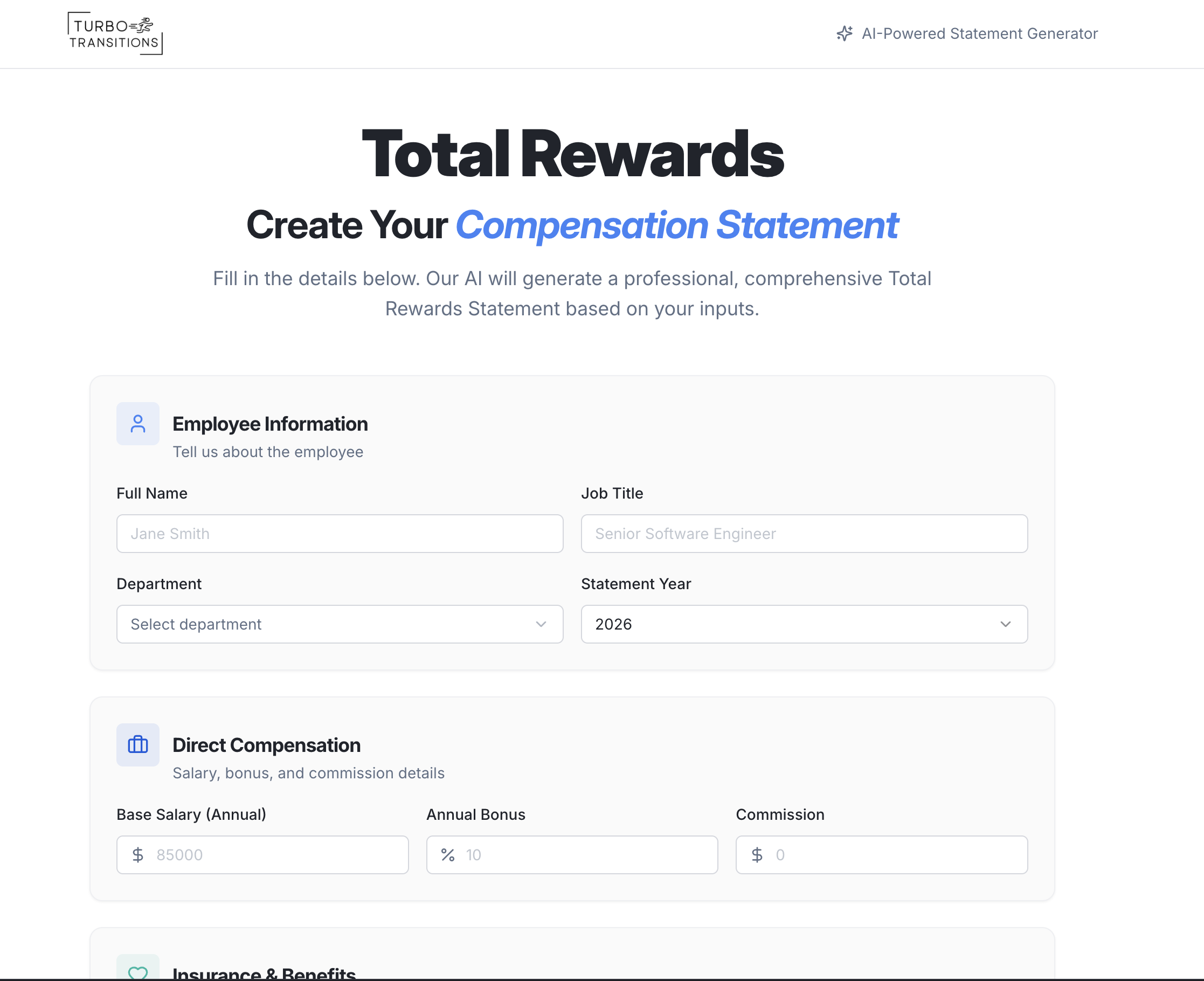
Total Rewards Compensation Tool
What it does:
This tool allows HR professionals to quickly generate comprehensive Total Compensation Statements for employees. Users input an employee's salary, bonuses, insurance benefits, retirement contributions, and additional perks into a simple form.
The tool automatically calculates derived values (like bonus dollars from a percentage, or PTO dollar value from days), creates a visual pie chart breakdown of the full compensation package, and uses AI to generate a personalized narrative summary explaining the employee's total rewards in plain language.
How it works:
An HR user fills out a multi-section form with employee details and compensation data. Smart inputs handle the math automatically — for example, entering a bonus as a percentage of salary or PTO as number of days, with dollar values calculated in real time.
Once submitted, the tool sends the data to an AI engine that generates a personalized written summary of the employee's total compensation.
The results page displays a detailed breakdown with a color-coded pie chart showing how each category (salary, insurance, retirement, perks) contributes to the total package. The entire process is stateless — no employee data is stored or saved anywhere, ensuring privacy.
Why it's beneficial for HR professionals:
Many employees don't realize the full value of their compensation beyond base salary. This tool helps HR teams quickly communicate that total value in a clear, visual, and personalized way — without needing design skills or spreadsheet expertise. The AI-generated narrative adds a professional, human touch that makes the statement feel tailored rather than templated.
Because no data is stored, it's also privacy-friendly, making it suitable for sensitive compensation discussions. It saves HR professionals significant time compared to manually creating these statements in Word or Excel, and the guided inputs with typical value ranges make it easy to use even for those unfamiliar with benefits benchmarks.

Why Showing Employees What They Earn Beyond Just Salary Is Important
Most employees think of compensation as their paycheck, but the true value of their job is usually much higher once you include benefits and employer-paid costs.
When HR clearly shows the full package, it reduces “I’m underpaid” frustration, builds trust, and helps employees understand what the company is actually investing in them.
Total compensation statements also make pay conversations more productive because they shift the discussion from salary alone to the entire rewards picture, including health insurance contributions, retirement match, bonuses, and paid time off.

“Take care of your employees and they’ll take care of your business.”
— Richard Branson, Founder of Virgin Group
Frequently Asked Questions (FAQ)
What is a total compensation statement?
A total compensation statement (sometimes called a total rewards statement) is a clear summary of an employee’s full pay package, not just base salary. It typically includes base pay, bonus/commission, employer-paid benefits (medical/dental/vision), retirement contributions or match, the value of paid time off, and any additional perks or allowances.
Key Takeaway: A total compensation statement shows the full value of employment in one easy-to-understand view.
Why provide total compensation statements if we already explain benefits during onboarding?
Most employees don’t remember onboarding details, and salary tends to become the main reference point over time. A compensation statement refreshes the full picture and helps employees understand what the company is actually paying for on their behalf, which can reduce confusion and improve trust. It also supports better questions and more informed decisions during benefits season.
Key Takeaway: Onboarding fades, but a total compensation statement makes your investment visible when it matters.
When is the best time to share total compensation statements?
The highest-impact moments are annual compensation reviews, open enrollment, retention conversations, and anytime you’re competing with outside offers. These are the times employees are already thinking about pay and benefits, so the statement feels relevant and timely rather than random. Many HR teams also share them after major benefits changes or when rolling out new bonus or retirement programs.
Key Takeaway: Share statements when employees are already focused on compensation so the message lands.
What should be included in a total compensation statement?
At a minimum, include base pay (or wages), bonus/commission (actual or target), employer-paid health contributions, retirement match/contributions, and paid time off value. Depending on your organization, you may also include employer-paid payroll taxes, life/disability insurance, HSA/HRA contributions, wellness benefits, education support, stipends, or other meaningful perks. The cleanest statements separate cash compensation from employer-paid benefits to reduce confusion.
Key Takeaway: Include the big-ticket items first, then add perks only if you can present them clearly and accurately.
How do we calculate benefit values in a way that’s accurate and defensible?
Use actual employer costs wherever possible. For health insurance, use the employer portion of premiums; for retirement, use match or contributions; for PTO, calculate a consistent value based on salary/wage rate and the number of PTO days. If you include perks that vary by usage, label them as estimated or avoid assigning a dollar value to protect credibility.
Key Takeaway: Accuracy builds trust, so base your numbers on real employer costs and consistent formulas.
Should we show employee-paid versus employer-paid amounts?
Yes, because it removes ambiguity and prevents misunderstandings. Employees often underestimate what the company pays for benefits, and separating the two helps them see the true employer contribution. It also makes benefits changes easier to explain because employees can see what moved and why.
Key Takeaway: Splitting employee-paid and employer-paid amounts makes the statement clearer and more credible.
Can total compensation statements backfire?
They can if they’re inaccurate, overly complicated, or used as a substitute for addressing real pay concerns. If the statement is positioned like a debate tool, employees may feel dismissed. The best approach is to frame it as transparency and education, keep it simple, and be ready to talk through questions without defensiveness.
Key Takeaway: Statements work when they inform, not when they’re used to “prove” someone shouldn’t care about salary.
Do total compensation statements actually help retention and pay satisfaction?
They often help, especially when benefits are strong or misunderstood. Employees may realize their total package is more competitive than salary alone suggests, which can reduce churn and improve satisfaction. That said, they won’t fix truly below-market pay, but they can make pay conversations more grounded and productive.
Key Takeaway: Total comp statements can boost appreciation and retention, but they’re not a replacement for competitive pay.
How should we tailor statements for hourly, salaried, and commission-based roles?
For hourly employees, show annualized earnings or year-to-date totals plus employer-paid benefits and PTO value. For salaried employees, show base salary plus bonus targets or actuals and benefits. For commission roles, decide whether you’re showing last year’s actual variable pay, target earnings, or both, and label it clearly so it doesn’t feel misleading.
Key Takeaway: Tailor the format to how the employee is paid, and label “actual” versus “target” clearly.
What are best practices for sharing statements securely and protecting privacy?
Treat these as sensitive compensation documents. Deliver them through secure channels like your HRIS portal, password-protected PDFs, or encrypted email, and limit internal access to whoever truly needs it. Avoid storing unnecessary identifiers and maintain a simple retention process so statements don’t end up scattered across inboxes and shared drives.
Key Takeaway: Secure delivery and limited access protect employee trust and reduce HR risk.
How often should we generate total compensation statements?
Most organizations do it annually because it aligns with compensation planning and open enrollment timing. Some also generate them after promotions, role changes, major benefits updates, or when an employee requests clarification during an offer comparison. The right cadence is one that keeps the information current without creating constant administrative work.
Key Takeaway: Annual is the standard, with “as needed” statements for major changes or retention moments.
Should we include equity or stock compensation in the statement?
Yes, if you can present it clearly and consistently. Equity can be confusing, so it helps to separate grant details (shares/units, vesting schedule) from estimated dollar value and clearly label any valuation as an estimate. If you can’t confidently communicate value in a way employees will understand, it’s better to include equity details without a dollar figure than to include a number that creates confusion or distrust.
Key Takeaway: Include equity when you can explain it simply, and label any valuation as an estimate.
Should we include employer payroll taxes (like FICA) in the total?
Some companies include them, but it’s optional. Including employer payroll taxes can show additional company cost, but many employees don’t perceive it as a “benefit” and it can distract from more meaningful categories. If your goal is employee appreciation, focus on benefits and retirement; if your goal is explaining total employer cost, payroll taxes can be included in a separate section.
Key Takeaway: Include payroll taxes only if your goal is showing total employer cost, not just total rewards.
How do we handle employees who waive benefits or have different plan selections?
Show the benefits the employee actually elected, along with the employer-paid portion for those elections. If someone waived medical coverage, don’t show a medical employer contribution unless you offer a cash-in-lieu benefit, in which case include that instead. The statement should reflect the employee’s real total package, not an “average employee” package.
Key Takeaway: Statements should reflect actual elections, not generic plan assumptions.
What if our benefits costs change mid-year?
If you generate statements annually, it’s fine to show the most recent plan year costs and label them as such. If you generate statements more frequently, use current premium rates and effective dates so employees aren’t comparing apples to oranges. For clarity, include a note like “Based on current benefit elections as of [date].”
Key Takeaway: Use current rates when possible and label the effective date so employees trust the numbers.
Should we show “market rate” comparisons or pay bands in the statement?
Usually no, unless you have a mature compensation philosophy and you’re confident in how it will be interpreted. Market comparisons can trigger debates about sources, percentiles, and job matching. Many HR teams keep the statement focused on what the employee receives today and handle market conversations separately during comp reviews.
Key Takeaway: Keep total comp statements focused on internal facts, and handle market comparisons elsewhere.
How do we prevent managers from using these statements in the wrong way?
Train managers on the intent and the talking points. The statement should support transparency and informed conversation, not “win” a pay argument. Give managers a simple script, explain what they should and shouldn’t say, and route complex questions back to HR. This avoids inconsistent messaging and prevents the statement from being used as a blunt tool.
Key Takeaway: Manager enablement matters as much as the statement itself.
What should we do if an employee disputes a number on the statement?
Treat it like a data quality issue, not a debate. Confirm the source of each value (payroll, benefits carrier, retirement plan admin) and correct any errors quickly. If the number is accurate but misunderstood, walk through the calculation and update the statement language so future employees don’t hit the same confusion.
Key Takeaway: Disputes are usually data or clarity problems, so verify sources and improve the explanation.
Can total compensation statements support recruiting and offer acceptance?
Yes, especially when your benefits are strong or your retirement match is meaningful. For candidates, a simplified “total rewards summary” can help them compare offers more accurately. Just make sure you clearly label targets versus actuals and avoid overpromising on variable compensation.
Key Takeaway: A clear total rewards summary can help candidates understand your offer beyond salary.
What’s the simplest version of a total compensation statement that still works?
A simple statement can be very effective if it includes the core categories and is easy to read. The best “minimal” version typically includes base pay, bonus/commission (actual or target), employer health contribution, retirement match/contribution, and PTO value. Add a short plain-language explanation and a small visual breakdown, and most employees will immediately “get it.”
Key Takeaway: Simple wins—include the big categories, explain them plainly, and keep the layout clean.
Disclaimer
Disclaimer. These tools and their outputs are for informational purposes only and are not legal, compliance, financial, tax, or HR advice; using them does not create an attorney–client or advisory relationship. Laws vary and change—always review results with your legal, benefits, and HR advisors before acting.
Data & access. By default we don’t store personally identifiable information you enter. Each tool is unlocked per page with your work email so we can send exports/resources and optional help; one tool’s email doesn’t unlock others, and you can unsubscribe anytime. If you choose Save, your project is stored securely and auto-deleted after {{X}} days; you can request deletion anytime at contact@turbotransitions.com.
Privacy & security. We use commercially reasonable safeguards, but no method is 100% secure. For saved projects you remain the data controller and we act as a processor under your instructions. You’re responsible for reviewing outputs before sharing and for controlling access to shared links/PDFs/CSVs. We may use de-identified, aggregated usage data to improve the tools; we do not sell personal data.
Scope, third parties & liability. Outputs are generic/non-jurisdictional and may not be complete or current; compliance-adjacent items include “verify with counsel” reminders. Linked third-party sites (e.g., carriers/HRIS) have their own policies—we’re not responsible for their content or security. Services are provided as is/as available with no warranties; to the extent allowed by law, we’re not liable for indirect or consequential damages.
Tags: total compensation statement, total rewards statement, employee compensation statement, total compensation statement template, total rewards statement template, total compensation calculator, total rewards calculator, employee total compensation calculator, how to create a total compensation statement, total compensation statement for employees